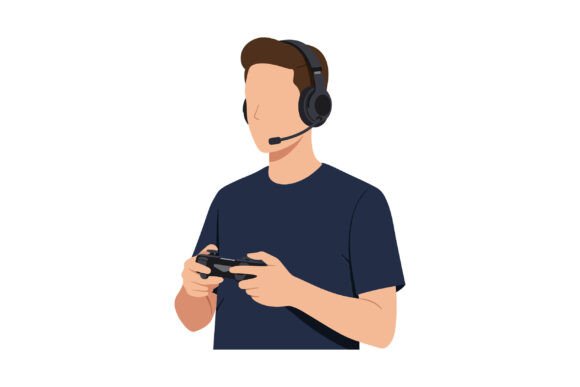
Young Man Wearing a Headset and Holding Controller
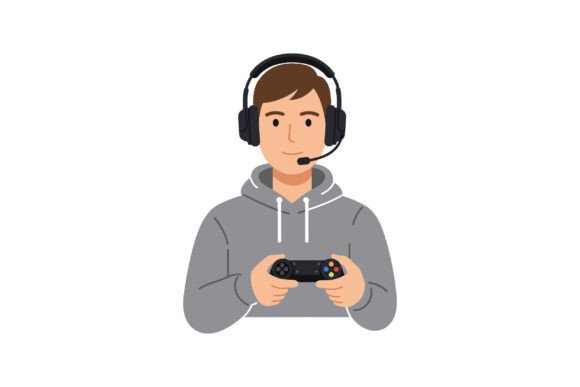
A focused gamer in a dark t-shirt grips a controller, headset snug, eyes locked on an unseen opponent. This vector illustration captures the intensity and excitement of competitive play—but it isn’t just a gaming image. It’s a versatile design asset that can serve creators, marketers, entrepreneurs, and educators alike. Available as a downloadable ZIP containing SVG, EPS, JPG, and PNG files, this minimalistic graphic offers a clean, modern look that adapts to countless contexts. Whether you’re building a brand, crafting a campaign, or teaching a workshop, this asset can add energy and relatability to your project.
What Makes This Asset Stand Out?
The illustration strips away clutter: a single character, dark clothing, neutral background, clear silhouette. That simplicity is its superpower. The SVG and EPS formats let you scale without losing quality—perfect for large-format prints or tiny icons. The JPG and PNG options work instantly for web use. The subject himself—a young man fully absorbed in gameplay—resonates with a wide audience. From hardcore esports fans to casual mobile gamers, many people see themselves in that moment of concentration and thrill. Designers value the minimalistic style because it fits into existing layouts without fighting for attention.
Need a hero image for a gaming blog? This graphic can anchor the page without overwhelming text. Planning a social media campaign for a gaming accessory brand? The asset’s neutral backdrop makes it easy to overlay product shots or call-to-action text. The multiple file types also streamline collaboration: share the PNG for quick previews, the SVG for web developers, the EPS for print production.
For Digital Creators and Bloggers
If you run a gaming, tech, or pop culture blog, visual consistency matters. This asset can become your go-to thumbnail template. Place it on a coloured background, add your article title beside the character, and export as PNG for social media. The headset and controller instantly signal “gaming content,” so readers know what to expect. You could even create variations—flip the image horizontally, change the background hue to match different post categories (red for reviews, blue for news, green for guides). Because the original SVG is vectorised, editing colours or scaling takes seconds in Illustrator or Inkscape.
For YouTube or Twitch, use the graphic as an overlay panel. The young man’s concentrated expression reinforces the “live” feel. Add your channel logo in a corner, and you’ve got a professional-looking stream screen without hiring an illustrator. The minimalistic style avoids distracting viewers from the actual gameplay or commentary.
For Marketers and Brand Managers
Small business owners launching a gaming headset line can place the illustration on product pages, email headers, or trade show banners. The headset the character wears is generic enough not to conflict with your own product design, but specific enough to create association. Pair the image with short taglines like “Uninterrupted Focus” or “Hear Every Move.” Because the asset is clean, it works equally well on a dark or light background—adapt it to your brand palette.
Event marketers planning an esports tournament can use the graphic on sponsor decks, social media countdowns, and venue signage. The young man’s dynamic pose suggests action, while the minimal style keeps the message clear. Overlay a date and location using a bold sans-serif font, and you have a poster in minutes. The EPS file guarantees print shops can output large banners without resolution issues.
For Educators and Trainers
Teachers or workshop facilitators covering topics like game design, digital media, or youth culture can insert this illustration into slide decks. It breaks up text-heavy slides and provides a visual anchor for discussions. For example, during a lesson on “The Psychology of Competitive Behaviour,” project the image and ask students to describe what the character might be feeling. The neutral expression invites interpretation—you can steer conversation toward focus, stress, teamwork, or flow state.
Curriculum designers creating online modules for game-based learning can use the PNG as a profile icon in forum threads or as part of a feedback form. The illustration feels contemporary but not childish, making it suitable for adult learners in continuing education programmes.
How to Make the Asset Work for Your Specific Audience
Adaptation starts with understanding who you’re targeting. For a young, gaming-savvy audience, keep the image as-is—its authenticity will feel familiar. For a broader demographic, such as parents or teachers, you might reduce the gaming vibe slightly by placing the character in a more neutral context. For instance, a career guidance article about “Transferable Skills from Gaming” could use the asset alongside text about problem-solving and reaction time. The headset becomes a symbol of communication, not just entertainment.
If your audience is professional (e.g., corporate training on remote tools), you can crop the image to focus on the upper body and headset, removing the controller. That subtle shift makes the character appear to be in a virtual meeting rather than a game—yet the intensity remains. Because the SVG is layered, customising such details is straightforward for anyone comfortable with vector software.
Practical Tips for Customisation
- Colour adjustments: Change the t-shirt shade to match your brand. If your primary colour is teal, recolour the shirt and add a teal border to the image.
- Background integration: Use the EPS or SVG to place the character inside a patterned backdrop, a gradient, or even a 3D-like scene. The isolated vector makes compositing easy.
- Text placement: Let the character take up one side of the canvas, leaving the opposite side for headlines or bullet points. This works exceptionally well for infographics and social media cards.
- Animation potential: For motion graphics, import the SVG into After Effects or similar software. Add subtle head movements or a light pulse behind the headset to create a looping GIF for websites.
- Multilingual support: Because the asset has no text, it travels internationally. A localisation team can add language-appropriate subtitles or call-to-action buttons without modifying the original illustration.
Keeping Your Visuals Cohesive and Audience-Friendly
One common mistake is mixing this asset with overly realistic photography or heavily detailed illustrations. The minimalistic style works best when supported by clean typography, ample white space, and a limited colour palette. If your brand aesthetic is already bold and busy, use the image sparingly—as a focal point in a larger graphic rather than a repeated pattern.
Consistency also extends to file management. The ZIP file gives you four formats, but decide early which version will serve as your master. I recommend the EPS for any printed materials and the SVG for web uses. Keep a high-resolution PNG (the one included likely is high-res) handy for quick social posts. By standardising on these, you avoid pixelated disasters when someone pulls the wrong file.
Originality Through Composition and Context
Even though you’re using a stock asset, your choices around composition and context make the end result unique. Pair the young man with a clever headline that relates to your specific message—don’t just let the image sit without narrative. For example, a fitness blog might juxtapose this focused gamer with the phrase “Training Your Mind: The Esports Workout.” That unexpected connection makes the graphic feel custom-tailored.
Similarly, you can experiment with cropping. Use only the character’s face and headset for avatar close-ups. Or isolate the controller hand for a more abstract motif. These variations keep your content fresh across multiple touchpoints while leveraging a single core asset.
Realistic Workflow Example: Launching a Gaming Cafe
Imagine you’re a small business owner opening a gaming cafe. Your budget is tight, so you need consistent visuals for your website, flyers, and social media. Here’s how this asset fits in:
- Website hero section: Place the young man on the left, with your cafe name and a “Book Now” button on the right. Use the SVG for responsive scaling.
- Event posters: Open the EPS in a page layout program. Add details for your opening tournament. The minimalistic style won’t clash with bold event colours.
- Social profile pictures: Crop the PNG to focus on the character’s head and headset. Add a subtle glow behind him to match your brand.
- Merchandise mockups: Use the SVG to print on t-shirts or stickers. The simple line work reproduces cleanly on fabric.
- Menu cards: Place a tiny version of the illustration near “gaming snacks” or “energy drinks” section headers. It ties the theme together without overwhelming the menu text.
By reusing the same asset across many touchpoints, you build brand recognition. Customers will associate that focused character with your cafe’s atmosphere. And because you started with a high-quality vector, you never worry about pixelation as you scale.
Final Recommendations for Asset Use
Keep the original ZIP archived safely. When you need a variant, duplicate the SVG or EPS first—don’t edit the only copy. Store the PNG as your “default” preview, but always rely on vectors for final production. If you’re working with a team, create a brief style guide noting colour or cropping rules, so everyone applies the asset consistently.
Remember that the young man’s expression—concentrated, excited—is what gives this graphic emotional weight. Don’t bury it under too many effects or cluttered layouts. Let the simplicity do the work. Whether you’re building a brand from scratch or refreshing an existing project, this headset-and-controller illustration delivers professional impact with minimal effort.