Mouse Pad Sunset: Sublimation Design for a More Productive Workspace
A mouse pad is often treated as an afterthought—a simple accessory grabbed from a drawer and placed on a desk without much consideration. But the surface you use every day for hours of clicking, scrolling, and creating has a direct impact on your comfort, speed, and even your mood. The Mouse Pad Sunset reimagines this everyday item by combining a vibrant, aesthetic sunset design with the precision of sublimation printing. It is not merely a decorative piece; it is a deliberate component of a workspace that prioritizes efficiency, consistency, and personal satisfaction. Whether you are a graphic designer finalizing a client project, a freelancer managing multiple tasks, or an entrepreneur refining your home office, the choice of mouse pad can subtly support your routine.
Where the Mouse Pad Sunset Fits in Your Workflow
Every project, task, or decision involves a sequence of actions. The workspace itself is the constant backdrop against which these actions unfold. The Mouse Pad Sunset serves as a foundational tool that is present before you start, during your work, and after you finish. Before a session, its calming visual cues can help you shift into a focused state, especially if you use the sunset imagery as a mental cue for task initiation. During a project, the smooth, consistent surface supports precise mouse movements and reduces wrist fatigue, which matters when you are editing a presentation, coding a feature, or managing a spreadsheet. After your work is done, the pad remains a low-maintenance part of your desk, its sublimated colors holding up against daily use.
This sublimation mouse pad integrates with your existing hardware seamlessly. It sits alongside your keyboard, monitor, and other peripherals, but it also interacts with your digital design assets if you choose to customize it further. For creative professionals, the sunset motif can serve as a reference point for color grading or mood setting in visual work. For productivity-minded users, the organized feel of a dedicated, personalized mouse pad reduces desktop clutter and signals that your workspace is intentional.
Practical Implementation: Using the Sublimation Mouse Pad
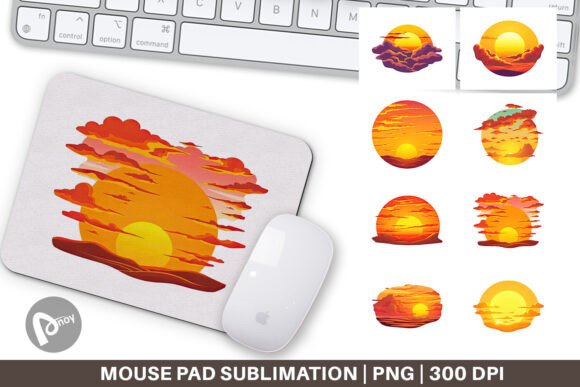
The Mouse Pad Sunset arrives as a set of eight digital files: 8 PNG files, each measuring 9.5 x 8.1 inches at 300 dpi. These files are not just images to be printed; they are blueprints for a final product that you can produce yourself or have produced by a printing service. The sublimation process involves transferring the design onto a polyester-coated mouse pad blank using heat and pressure. This method ensures that the sunset gradient remains vivid and resistant to fading, even with regular cleaning and prolonged exposure to ambient light.
Preparation and Planning for Your Setup
Before you print or order, consider where the mouse pad will sit. Measure your desk space and confirm that the 9.5 x 8.1 inch dimensions suit your mouse movements. This size is compact enough to fit in a tightly organized workflow but generous enough to accommodate both a standard mouse and occasional wrist rest. Because you have eight distinct PNG files, you can experiment with different sunset compositions—some with warmer tones, others with cooler gradients—to match your existing desk color palette or your personal preferences. Compatibility matters: ensure your printer supports sublimation ink and that your mouse pad blank is designed for sublimation transfer. If you outsource, check that the service accepts 300 dpi PNG files for best results.
Integration with Other Desktop Resources
A mouse pad does not work in isolation. The sublimation mouse pad interacts with your chair height, monitor position, and keyboard tray angle. When correctly placed, it creates a consistent surface that reduces friction, allowing for smoother cursor control. This is particularly useful during tasks that require fine precision, such as photo retouching or dashboard navigation. If you use a trackball or vertical mouse, the pad still offers a stable base. Additionally, the sunset design can visually unify a workspace that features other color-coded accessories, reinforcing a sense of order. Over time, this subtle repetition of color and texture reduces cognitive load, helping you focus on the work itself rather than on your surroundings.
Usability and Efficiency Gains
The primary functional benefit of any mouse pad is reducing friction and protecting your desk surface. But the Mouse Pad Sunset goes further by contributing to ergonomic comfort. The sublimation process results in a smooth, non-porous surface that glides easily while still giving your mouse enough traction for precise stops. Over hours of use, this reduces the micro‑adjustments your wrist and fingers must make, lowering the risk of strain. The aesthetic aspect is not merely decorative; visual comfort influences productivity. A pleasing image can lower stress levels and help maintain focus during long sessions. For professionals who conduct video calls, the mouse pad also appears in the background of your frame. A clean, attractive design projects a sense of professionalism and attention to detail.
Long-Term Use and Quality Control
Sublimation printing is known for its durability. Unlike surface coatings that can peel or fade, the dye becomes part of the fabric. With the sublimation mouse pad, you can expect the design to remain intact after months of use, provided you follow basic care. Cleaning is straightforward: wipe with a damp cloth using mild soap; avoid abrasive cleaners or machine washing. The 300 dpi resolution ensures that the sunset gradients are smooth and free of pixelation, even on close inspection. When you receive your printed pad, examine the edges for proper heat sealing and ensure that the image is centered. Consistent quality control at the beginning prevents issues later. If you produce multiple pads for different workstations, using the same set of files guarantees uniformity across your workspace.
Workflow Examples for Different Users
To see how this mouse pad fits into real processes, consider three scenarios.
A graphic designer working on a branding project starts the day by organizing their desk. They place the Mouse Pad Sunset as a deliberate color accent next to their drawing tablet. The sunset hues subtly influence their color picking as they adjust a logo palette. The smooth mouse mat allows for fluid brush strokes and precise layer adjustments. After finishing the design, the pad's presence serves as a visual cue that the workspace is now in "review mode," signaling a mental shift toward quality checking.
A freelance writer and editor spends hours moving between research tabs and document editing. Their mouse is used extensively for highlighting, copy‑pasting, and navigating long documents. The consistent surface of the sublimation mouse pad prevents cursor jumps and reduces the need for repeated movements. The sunset design, with its warm tones, is chosen to counterbalance the blue light from the screen, creating a more balanced visual field. At the end of a writing session, the pad remains clean and ready for the next day.
An online educator uses the mouse pad during live courses. The cleaner, more attractive desk setup appears on camera, supporting their professional brand. The pad also doubles as a visual timer reference: placing a small object like a pen at a specific spot on the pad reminds them to check the clock or move to the next topic. Over time, this spatial cue becomes part of their teaching workflow without requiring conscious effort.
Observations for Smooth Integration into Your Routine
Integrating the Mouse Pad Sunset into your daily work is straightforward but benefits from a few practical considerations. First, allow a brief adjustment period if you are switching from a different pad size or material. Your muscle memory will adapt within a few sessions to the new glide resistance. Second, position the pad so that it aligns with your natural hand reach while keeping your forearm parallel to the floor. This reduces strain and makes the pad feel like a natural extension of your arm. Third, if you use multiple monitors, place the pad centrally so you can reach left and right without repositioning. The 9.5 x 8.1 inch size is small enough to fit easily but large enough to provide stability for most workflows.
Finally, treat the eight PNG files as a resource. You might print one for your primary desk, another for a travel setup, and keep the rest as backups. Or you can experiment with different sunset variants over time to refresh your environment. The sublimation process allows for high-fidelity reproduction, so each copy will match your original vision closely. By planning your order, printing, and placement carefully, you ensure that this simple accessory becomes a reliable part of your professional toolkit.
The Mouse Pad Sunset is not about hype or decoration for its own sake. It is about making a small, deliberate choice that supports how you work. Whether you are preparing for a deep focus session, executing a complex project, or finishing your day with administrative tasks, a comfortable, well-designed mouse pad can subtly enhance your workflow. It sits under your hand, every day, reinforcing both your comfort and your commitment to a workspace that works for you.