Galactic Astronaut T-Shirt Designs: Choose Wisely for Success
Space-inspired apparel has never been more popular. Whether you run a clothing store, manage a print-on-demand shop, or simply want to create custom gear for a science fair or gaming community, Galactic Astronaut T-Shirt Designs offer a versatile starting point. But picking a set of designs—especially one that includes EPS, SVG, PNG, JPG, and other files—can be trickier than it looks. Many buyers focus only on the visuals and overlook practical issues that affect print quality, usability, and even legal safety. Let's walk through the common pitfalls and how to avoid them.
Understanding What the File Bundle Actually Gives You
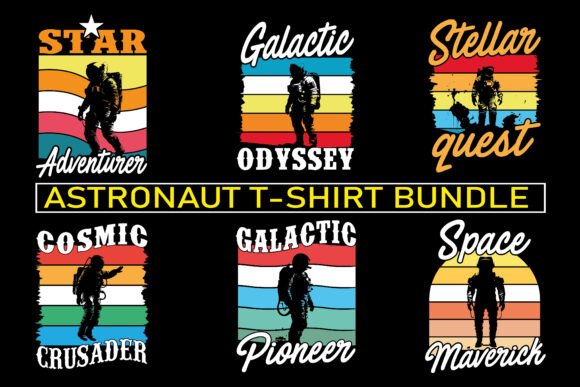
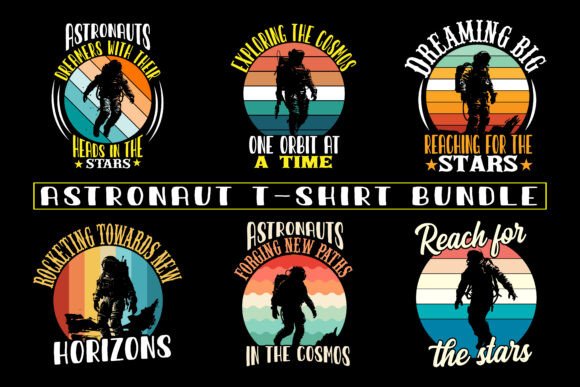
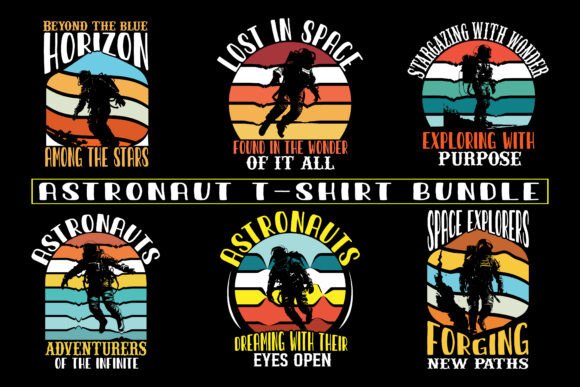
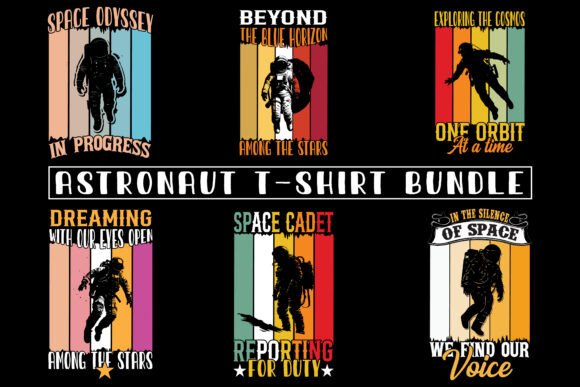
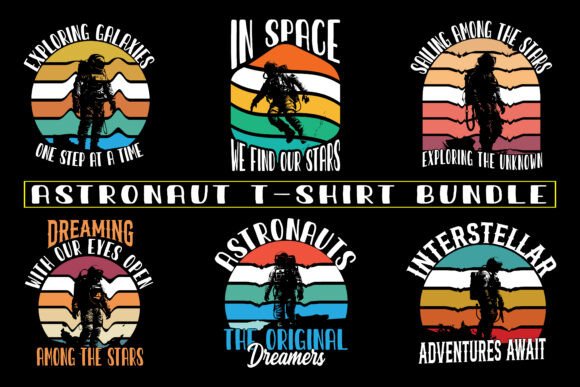
A typical Galactic Astronaut T-Shirt Designs package includes six EPS files, six SVG files, six transparent PNG images, and six JPG files. That sounds comprehensive, but each format serves a different purpose. EPS and SVG are vector files—they scale infinitely without losing quality, making them essential for large prints, embroidery digitizing, or resizing for different garment sizes. The PNG files (with no artboard border line) are great for quick mockups and layering in design software, while JPG files work for previews and web use but are less flexible for professional production.
The mistake many beginners make is assuming all formats are interchangeable. They might try to enlarge a JPG for a hoodie back print and end up with pixelation, or they might use a PNG with a semi-transparent background that leaves a faint halo on dark shirts. Before you download any set, verify that the vectors are well-constructed—open an EPS in Illustrator or Inkscape and check for stray points, overlapping paths, or missing details. A clean vector saves hours of cleanup later.
Overlooking Transparent Background Quality
The PNG files in these bundles are advertised as having transparent backgrounds with no artboard border line. That is a big plus for direct use in programs like Canva or Photoshop. But not all transparency is created equal. Some designs suffer from aliasing (rough edges) or leftover pixels from the original background, which become obvious when placed on a dark tee. Before you buy, look for previews that show the PNG on a dark background. If the seller doesn't provide that, ask for a sample. A crisp, smooth transparency is non-negotiable for professional-looking merchandise.
Also, note that transparent PNGs are flat rasters. They cannot be recolored easily or scaled up beyond their resolution. If you need to change the astronaut's suit from white to neon green, you will need the vector files. Relying solely on PNGs for print-on-demand can limit your design variations and force you to work with fixed sizes.
Scalability: Vector vs. Raster Confusion
A frequent oversight is not understanding when to use vectors versus rasters. For screen printing, vector files (EPS or SVG) are almost always required because the separation of colors works from vector paths. For direct-to-garment printing, high-resolution PNGs (300 DPI) are acceptable, but vectors still give you flexibility to adjust the design without restarting. Trying to convert a low-resolution PNG to a vector later will produce poor results. Always choose bundles that offer well-built vectors made from actual paths, not auto-traced bitmaps.
If you plan to sell designs on platforms like Redbubble or Teespring, they accept both, but vector-based uploads often render better at larger print sizes. For tote bags or hoodies, the same design might need to be scaled up significantly—vector files handle that gracefully, while rasters begin to show jagged edges. Check the resolution of the included JPGs and PNGs: they should be at least 3000 pixels on the longest side for safe resizing.
Misjudging the Design for Different Merchandise
Galactic Astronaut T-Shirt Designs are often created with a t-shirt front print in mind. But if you intend to use the same artwork on hoodies, tote bags, or even stickers, you need to consider placement and composition. A design that looks great centered on a tee might lose impact when printed small on a tote or stretched across a hoodie back. Some bundles include multiple variations (e.g., front and back), but many do not. Before purchasing, visualize how each design would fit different products. If the design has intricate details, they may disappear on a small sticker or become distorted when scaled down.
Better approach: choose a bundle that offers separate layouts for different product types, or at least vectors that allow you to rearrange elements easily. For example, you might want to isolate the astronaut character and use it alone on a pocket tee. With the vector files, that's straightforward; with only a flat PNG, you cannot easily remove the background star field.
License and Usage Rights: The Overlooked Trap
One of the most expensive mistakes is assuming that buying a design bundle automatically grants commercial rights for unlimited merchandise sales. Many sellers offer personal use only, or they restrict the number of products you can produce. Galactic Astronaut T-Shirt Designs from some marketplaces may be royalty-free for commercial use, but always read the fine print. If you plan to sell on print-on-demand platforms like Etsy, Redbubble, or Teespring, you need a license that explicitly covers “commercial use” and “POD use.” Some licenses even stipulate that you cannot sell the design as a standalone digital file—only on physical products.
To avoid legal headaches, check the product description for phrases like “commercial license included” or “unlimited commercial use.” If it's not clear, contact the seller before purchasing. A cheap bundle that leads to a copyright claim can cost you far more in lost revenue and potential takedowns.
Color Accuracy and Print Expectations
Space-themed designs often feature vivid nebula colors, galaxy gradients, and glowing astronaut helmets. What you see on your monitor may not reproduce well on a t-shirt. Dark backgrounds can swallow details, and bright whites may show through thin garment fabrics. When you work with Galactic Astronaut T-Shirt Designs, ask yourself whether the design relies heavily on screen-only effects like transparency or gradient blends. For screen printing, those gradients must be simulated with halftones, which changes the look. For DTG, the colors may shift slightly depending on the printer and fabric color.
Practical tip: order a test print of one design before committing to a full product line. Also, request mockups on different shirt colors from the seller if available. If the design uses a lot of fine lines or delicate stars, they may become blurry on low-quality print methods. Vector files allow you to thicken lines or adjust colors more easily than rasters, so lean on those for print adjustments.
Composition for Apparel Placement
Another detail that often goes overlooked is where on the garment the design sits. A design that fills a square perfectly may look awkward if placed too high or too low. Many print-on-demand platforms have recommended sizing guidelines (e.g., 10–12 inches wide for a standard adult tee). If the design's proportions are not square, you may need to add spacing or align the astronaut in a way that follows the natural flow of the body. Some Galactic Astronaut T-Shirt Designs include a centered composition that works well for front prints, but check whether the bundle provides alternate placements (e.g., left chest, back, sleeve).
If the bundle does not include layered vectors, you might be stuck with a single layout. For maximum versatility, look for sets that contain the astronaut as a separate element from the background—this lets you reposition, scale, or remove stars and planets as needed. The included EPS and SVG files should be fully editable; open them and verify that you can unhide layers and move pieces independently.
Ignoring the Needs of Specific Communities
Galactic Astronaut T-Shirt Designs can appeal to a wide audience: sci‑fi fans, astronomy clubs, NASA enthusiasts, gamers, and even educators. But a generic design might not resonate with any group deeply. If you are targeting a niche, such as a specific gaming community or a science fair, the design should reflect relevant symbols or colors. A bundle with a classic retro astronaut works for many contexts, but if you need a more modern or stylized look, make sure the design style aligns.
Mistakenly assuming one set fits all communities can lead to slow sales. Instead, evaluate your target customer: are they looking for something minimalist, detailed, humorous, or educational? If the bundle only offers one style, you may need to customize it extensively. The vector files help here: you can recolor the suit to match a team color, add text, or remove elements to simplify for children's sizes.
What to Check Before You Buy or Download
Before clicking purchase, run through this short checklist:
- File formats: Does it include EPS, SVG, and transparent PNG? Are the vectors editable and free of missing elements?
- Resolution: Are the PNG and JPG files at least 300 DPI and large enough for the products you plan to make?
- Transparency quality: Check previews on dark backgrounds to see if edges are clean.
- Commercial license: Is it explicitly stated? Can you use the designs on print-on-demand and physical merchandise without limits?
- Scalability: Can you resize the vector files without distortion? Test a quick scale.
- Composition variety: Does the bundle offer multiple placements or isolated elements?
- Color proof: Are the colors print-friendly? Avoid designs that rely on screen glow effects that won't translate to fabric.
Practical Steps to Get the Most from Your Designs
Once you have a reliable set of Galactic Astronaut T-Shirt Designs, start by organizing the files: keep vectors in a folder, PNGs in another. Use the EPS or SVG files for any resizing, recoloring, or layering. For print-on-demand, upload the high-resolution PNG (with transparent background) to platforms like Redbubble or Teespring—but if you need to make adjustments, always go back to the vector. For screen printing, send the EPS or SVG with color separations clearly marked. For tote bags or hoodies, consider enlarging the design slightly and using a bold version of the astronaut to ensure it reads well at a distance.
Also, create mockups using the transparent PNG on different colored shirt backgrounds before production. This helps you spot contrast issues early. If the design looks washed out on a black shirt, consider adding a subtle white outline or glow effect using the vector file. Many beginners skip this step and end up with prints that blend into the fabric.
Finally, if you are selling to museums, planetariums, or science events, ensure the design includes accurate astronomical elements if that matters to your audience. While artistic license is fine, some customers appreciate scientifically inspired details like correct constellations or realistic planet textures. If your bundle lacks that, you may need to modify it—again, vectors make that possible.
Choosing the right Galactic Astronaut T-Shirt Designs file set is about more than just the artwork itself. It's about understanding file formats, license terms, print limitations, and the specific needs of your market. By avoiding these common mistakes—neglecting vector importance, ignoring transparency quality, overlooking scalability, and forgetting to verify commercial rights—you set yourself up for a smoother production process and higher customer satisfaction. Take the time to evaluate bundles thoroughly, test prints when possible, and always keep the end use in mind. The final result will be merchandise that not only looks good but also performs well in the real world.