E-sport and Video Game Concepts: Choosing the Right Social Media Banner Set for Your Brand
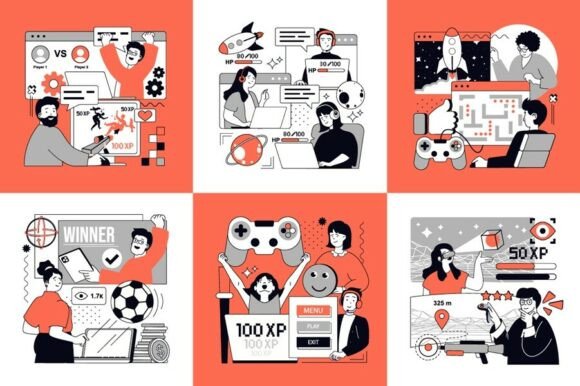
If you have ever tried to promote an e-sport event, a gaming channel, or a video game related business on social media, you know how much the visuals matter. A well designed banner can stop a scroll, communicate professionalism, and draw in your audience. That is where an E-sport and Video Game Concepts social media banners set comes in. These bundles typically include vector illustrations of people playing online, streaming gaming, and winning cyber sport virtual competitions, all packaged into formats like EPS10, AI, JPG, PDF, PNG, and SVG. They sound like a quick solution, and they can be, but only if you choose and use them correctly. Many people grab the first set they find and wonder later why their pages look generic, cluttered, or disconnected from their brand. Let us walk through the common pitfalls and how to avoid them.
What Exactly Is an E-sport and Video Game Concepts Banner Set?
At its core, this type of banner set is a collection of pre designed graphic assets. The illustrations focus on e-sport and video game culture: players at their desks, streamers with microphones and cameras, trophy celebrations, and dynamic gaming screens. The vector format means you can scale the images without losing quality, which is essential whether you are using them for a tiny mobile banner or a large event poster. The inclusion of multiple file types gives you flexibility. For example, the SVG and EPS files work well for further editing in design software, while the PNG files offer ready to use transparency. The JPG and PDF versions are convenient for quick uploads or client approvals.
People turn to these sets because custom illustration can be expensive and time consuming. A ready made concept pack promises speed and consistency. But the key word here is concepts. They are not brand specific. They are generic scenes that you are expected to adapt. That is where the misunderstandings begin.
Mistake 1: Treating the Set as a Final Product Instead of a Starting Point
One of the most frequent errors is downloading the set and using the illustrations exactly as they are, with no modification. The result is a banner that looks like a stock template. Other people in your niche may own the same set. Your brand identity gets lost in a sea of similar visuals. Beginners especially fall into this trap because the illustrations look polished right out of the folder.
How this affects your results: Your presentation feels generic. Viewers may not trust your brand as much because it does not look unique. In a competitive space like e-sport content, originality matters for credibility.
Better approach: Use the illustrations as a foundation. Change the colors to match your brand palette. Add your own logo, text overlays, and custom backgrounds. If you have design skills, modify the vector shapes in Adobe Illustrator or Affinity Designer. For example, take the player character from the set and give them a jersey with your team name. Even small tweaks make a big difference.
Mistake 2: Ignoring the File Formats and Their Purposes
The set includes EPS10, AI, JPG, PDF, PNG, and SVG. Many users grab the JPG file because it is easy to open, but then they try to resize it for a large print or a high resolution screen. The JPG will pixelate. Others open the PNG and wonder why they cannot edit the individual elements. The frustration comes from not understanding what each format is for.
How this affects usability and efficiency: You waste time trying to make the wrong file work. You might settle for a lower quality result because you did not use the vector files for scaling. If you are a freelancer or small business owner, every minute counts. Using the wrong format can cost you.
Better approach: Think of the formats in two groups: editable and ready to use. The EPS10, AI, and SVG files are your editable vectors. Use them when you need to change colors, resize infinitely, or extract individual elements. The PDF is useful for sharing proofs with clients or printing at high quality. The JPG and PNG are your final output files. If you are a non designer and only need a quick social media post, the PNG gives you a clean image with transparency. If you are a marketer preparing a print banner, start with the AI file and export at the correct resolution.
Mistake 3: Overlooking the Composition and Layout for Different Platforms
Each social platform has its own banner dimensions and safe zones. A design that looks great on a desktop YouTube banner may crop awkwardly on a mobile Twitter header. The illustrations in the set are not automatically optimized for every platform. Users often place the illustration too high or too low, causing key elements to get cut off.
How this affects presentation and communication: Your banner may display incorrectly on mobile devices, hiding the player character or the text. This reduces the impact of your message and looks unprofessional.
Better approach: Before you start, research the current recommended dimensions for each platform you plan to use. For example, Twitch banners have specific safe zones for offline screens and panel headers. Create a document with guides that mark the safe area. Position the most important parts of the illustration, such as the player's face or the trophy, within that safe zone. Leave the edges for background elements that can be cropped without losing meaning.
Mistake 4: Choosing a Set That Does Not Match Your Content Vibe
Not all e-sport and video game concepts are equal. Some sets lean heavily into a futuristic, cyber aesthetic with neon colors and robotic elements. Others have a more casual, friendly art style with bright colors and smiling characters. If you run a serious competitive team and you choose a cartoonish set, your branding sends mixed signals. Conversely, a casual streamer using a dark, aggressive style may feel intimidating to new viewers.
How this affects your connection with the audience: Your visuals are the first impression. If the art style does not align with your content, viewers may feel confused or disinterested. They might click away before reading your bio.
Better approach: Look at the sample illustrations carefully. Ask yourself: Does this feel like my channel, my team, or my brand? If you see characters that look like they are from a different genre, keep looking. Many marketplaces allow you to preview every file in the set. Use that preview to assess the overall tone. If you cannot find a perfect match, consider a set that is more neutral and can be easily recolored or restyled.
Practical Advice for Buying and Using These Sets
Before you click purchase, check the license agreement. Some sets are for personal use only, which means you cannot use them for commercial streams or sponsored content. Others require attribution. If you are a business owner or marketer, look for a royalty free commercial license. This small step saves you from legal headaches later.
Also, verify the number of unique scenes included. Some sets advertise six banners, but they are simply variations of the same scene with different text. A good set offers distinct illustrations: one for a streamer setup, one for a tournament victory, one for a team lineup, and so on. This variety lets you tell a story across your social media profiles.
When you download the ZIP file, take a few minutes to organize the files. Create folders by format type and by scene name. This seems like a small step, but when you are rushing to post a tournament update at midnight, you will be grateful that you can find the right PNG instantly.
Test the vectors in your design software before you commit to a final layout. Open the AI or EPS file and check that the layers are named logically. Some poorly organized sets have everything on one layer, making editing tedious. If that happens, you can still work with it, but expect extra effort. If you are not comfortable with vector editing, stick with the PNG files and use them as overlays on your own backgrounds.
What to Check Before Making a Decision
Look at the resolution of the PNG files. They should be at least 300 DPI if you plan to print. For web use, 72 DPI is usually fine, but higher resolution gives you flexibility. Check the color mode as well. CMYK is better for print, RGB for screens. A set that provides both is ideal.
Consider the diversity of the characters. Does the set include different body types, skin tones, and gear? A modern e-sport audience values representation. Using a set that only shows one type of player may unintentionally alienate part of your audience. It is a small detail that reflects well on your brand awareness.
Finally, think about future use. A good banner set is not a one time purchase. If you buy a set with versatile illustrations, you can repurpose the assets for thumbnails, stream overlays, and even merchandise mockups. The vector files especially allow you to extract individual elements like a gaming mouse or a headset and use them in other projects. That adds real value to your investment.
Final Thoughts on Getting It Right
An E-sport and Video Game Concepts social media banners set can save you time and elevate your visual presence, but only when you treat it as a tool rather than a finished product. Avoid the urge to use everything straight out of the ZIP file. Customize your colors, plan your layout for each platform, and choose a set that mirrors your brand personality. Understand the difference between vector and raster files so you never end up with a pixelated banner again. And always check the license before you use the assets commercially.
When you approach these sets with a clear strategy, they become an asset that helps you communicate professionalism, attract the right audience, and focus more time on what you do best: creating great gaming content. Whether you are a seasoned team manager or a solo streamer just starting out, a thoughtful banner is one of the easiest ways to show that you take your work seriously. Take the time to get it right, and your audience will notice.